2016/05/27

How to replace iphone 4s lcd screen and digitizer assembly

Step 1. Before disassembling your iPhone, be sure it is powered off. Your iPhone 4s rear cover may have either two #000 Phillips screws or Apple's 5-Point "Pentalobe" screws (second image). Check which screws you have, and ensure you also have the correct screwdriver in order to remove them.

 LCDONE iPhone 4s LCD Screen Replacement Installation 1


Step 2. Push the rear panel toward the top edge of the iPhone.

 LCDONE iPhone 4s LCD Screen Replacement Installation 2


Step 3. Pinch the rear panel with your fingers and lift it away from the iPhone. Alternatively, use aSmall Suction Cup.

 LCDONE iPhone 4s LCD Screen Replacement Installation 3


Step 4. Remove the single 2.5 mm Phillips screw securing the battery connector to the logic board.

 LCDONE iPhone 4s LCD Screen Replacement Installation 4


Step 5. Use a plastic opening tool to gently pry the battery connector up from its socket on the logic board.Remove the metal clip covering the antenna connector.

 LCDONE iPhone 4s LCD Screen Replacement Installation 5


Step 6. Use the clear plastic pull tab to gently lift the battery out of the iPhone.Remove the contact clip from the iPhone.

 LCDONE iPhone 4s LCD Screen Replacement Installation 6


Step 7. Use a SIM card eject tool or a paperclip to eject the SIM card and its holder.Remove the SIM card and its holder.

 LCDONE iPhone 4s LCD Screen Replacement Installation 7


Step 8. Remove the following two screws: One 1.2 mm Phillips One 1.6 mm Phillips Remove the thin steel dock connector cable cover from the iPhone.

 LCDONE iPhone 4s LCD Screen Replacement Installation 8


Step 9. Use an iPod opening tool to gently pry the dock cable connector up off the logic board from both short ends of the connector.

 LCDONE iPhone 4s LCD Screen Replacement Installation 9


Step 10. Carefully peel the dock ribbon cable off the logic board and the lower speaker enclosure.

 LCDONE iPhone 4s LCD Screen Replacement Installation 10


Step 11. Use a plastic opening tool to pry the lower antenna connector up off its socket on the logic board.

 LCDONE iPhone 4s LCD Screen Replacement Installation 11


Step 12. Remove the 1.9 mm Phillips screw securing the bottom of the logic board to the inner case.

 LCDONE iPhone 4s LCD Screen Replacement Installation 12


Step 13. Remove the following five screws securing the Wi-Fi antenna to the logic board: One 2.3 mm Phillips Two 1.6 mm Phillips One 1.4 mm Phillips One 4.8 mm Phillips

 LCDONE iPhone 4s LCD Screen Replacement Installation 13


Step 14. Use an iPod opening tool to slightly lift the top edge of the Wi-Fi antenna away from the logic board. Use the tip of a spudger to pull the Wi-Fi retaining clips away from the inner frame. Remove the Wi-Fi antenna from the iPhone. Make sure you don't lose the metal clips on the top of the cover where the 4.8mm screw attaches or the 4.8mm screw. That's the primary reason for abnormal Wi-Fi performance after the reassembly.

 LCDONE iPhone 4s LCD Screen Replacement Installation 14


Step 15. Use an iPod opening tool to carefully lift the rear camera connector up off its socket on the logic board. Remove the rear camera.

 LCDONE iPhone 4s LCD Screen Replacement Installation 15


Step 16. Remove the small circular white sticker (warranty sticker and water indicator) covering the screw near the battery pull tab. Remove the 2.4 mm Phillips screw that was hidden underneath the sticker.

 LCDONE iPhone 4s LCD Screen Replacement Installation 16


Step 17. Use the edge of a plastic opening tool to gently pry the following connectors up and out of their sockets on the logic board: Digitizer cable (pry from bottom) LCD cable (pry from bottom) Headphone jack/volume button cable (pry from top) Top Microphone/sleep button cable (pry from top) Front camera cable (pry from top)

 LCDONE iPhone 4s LCD Screen Replacement Installation 17


Step 18. Use a small flathead screwdriver to remove the 4.8 mm standoff near the headphone jack.When reassembling the motherboard, ensure that its edge sits under the circled standoff, otherwise the screws will not fit. When reassembling ensure that the small rubber spacer attached to the top of the motherboard is in place. Without this part the motherboard could damage the ribbon cables around it.

 LCDONE iPhone 4s LCD Screen Replacement Installation 18


Step 19. Carefully remove the logic board from the iPhone, minding any cables that may get caught.

 LCDONE iPhone 4s LCD Screen Replacement Installation 19


Step 20. Remove the single 2.4 mm Phillips screw securing the speaker enclosure to the side of the inner frame.

 LCDONE iPhone 4s LCD Screen Replacement Installation 20


Step 21. Remove the speaker enclosure from the iPhone.

 LCDONE iPhone 4s LCD Screen Replacement Installation 21


Step 22. Remove the following two screws securing the vibrator to the inner frame: One 6 mm Phillips One 1.4 mm Phillips Remove the vibrator from the iPhone.

 LCDONE iPhone 4s LCD Screen Replacement Installation 22


Step 23. Remove the 1.5 mm Phillips screw securing the front panel near the headphone jack.

 LCDONE iPhone 4s LCD Screen Replacement Installation 23


Step 24. Remove the three large-headed 1.5 mm Phillips screws along the volume button side of the iPhone.

 LCDONE iPhone 4s LCD Screen Replacement Installation 24


Step 25. Remove the 1.5 mm Phillips screw near the lower microphone.

 LCDONE iPhone 4s LCD Screen Replacement Installation 25


Step 26. Remove the 1.5 mm Phillips screw near the dock connector ribbon cable.

 LCDONE iPhone 4s LCD Screen Replacement Installation 26


Step 27. Remove the three large-headed 1.5 mm Phillips screws along the SIM card side of the iPhone.Remove the small-headed 1.5 mm Phillips screw near the rear camera.

 LCDONE iPhone 4s LCD Screen Replacement Installation 27


Step 28. Carefully insert the edge of an iPod opening tool between the rubber bezel around the front glass panel and the steel inner frame. Do not attempt to insert the tool between the glass and the rubber bezel. Carefully pry the upper edge of the front panel assembly away from the steel inner frame.

 LCDONE iPhone 4s LCD Screen Replacement Installation 28


Step 29. Slowly and gently lift the top edge of the front panel assembly away from the steel inner frame. Continue to rotate the front panel assembly away from the steel inner frame until it slowly begins to peel off the adhesive applied below the home button area. It may be easiest to insert a spudger at the top and work it around the edges, spreading gently as you go. Carefully pull the lower edge of the front panel assembly away from the steel inner frame.

 LCDONE iPhone 4s LCD Screen Replacement Installation 29


Step 30. De-route the digitizer and LCD cables through the steel inner frame, and remove the display from the iPhone.When the front panel has been correctly installed, both the LCD and digitizer cables should be immediately next to one another and should be the same length, as shown in the second photo.During reassembly, do not touch the metallic area at the base of the LCD data cable, as this can cause problems with the LCD. If you do touch it accidentally, clean it gently with an alcohol wipe before continuing.

 LCDONE iPhone 4s LCD Screen Replacement Installation 30


Step 31. Your replacement display may come with colored plastic film on the back of the LCD. If so, use the pull tab near the home button to peel the plastic film from the LCD before installing the new display in your iPhone. After reassembly, clean the touchscreen surface with an alcohol wipe prior to turning the iPhone back on. The alcohol helps dissipate any lingering static electricity, which can cause problems with the display. After reassembly, protect your new display from any scratches by installing a newscreen protector.

 LCDONE iPhone 4s LCD Screen Replacement Installation 31


LCDONE,a high-tech company providing the solutions for the mobile phone broken glass screen,including iPhone LCD recycling,Samsung Galaxy LCD recycling,iPhone LCD screen repair swap,Samsung Galaxy LCD screen repair swap,iPhone LCD screen replacement,iPad touch screen replacement and mobile phone accessories.


We do not produce the mobile phone lcd screen, we only do recycle,repair swap and resell lcd screen.


Surprise, now ,register on our website https://www.lcdone.com, with the referral code:jackievon001, you can get a $5 gift certificate. And if you submit order on our website, we will send the free iPhone Repair Tools Kits to you together at the time of delivery.

2016/05/26

how to replace iphone 6 lcd screen and digitizer assembly

step 1.power down your iPhone 6;

step 2.remove the two bottom three point four millimeter pencil of screws located next to the Lightning connector;

step 3.police are searching cars near the home button, while playing firm constant force used the plastic triangle opening tool to work around the display assembly is separated from the iPhone 6 rear case, the display assembly is still connected to the iPhone by several cables, so don't try to remove it ntirely just yet;

step 4.remove the following 5 Phillips screws securing the metal bracket to the motherboard,now use the fine tip curve tweezers to remove the metal bracket and disconnect the LCD digitizer and front camera in proximity sensor cables;

step 5.remove the following three phillips screw securing the earpiece speaker bracket to the display assembly, with the tweezers remove the bracket, in this year P speaker;

step 6.gently pry the front camera in proximity sensor ribbon cable away from the display assembly;

step 7.remove the following to phillips screw securing the home button metal bracket in place, disconnected peel the home button ribbo cable way from the display assembly, remove the home button assembly;

step 8.remove the seven Phillips screws that secure the LCD shield plate to the display assembly,

killed the adhesive securing the home button cable connector to the front panel, and remove the LCD shield played.

LCDONE,a high-tech company providing the solutions for the mobile phone broken glass screen,including iPhone LCD recycling,Samsung Galaxy LCD recycling,iPhone LCD screen repair swap,Samsung Galaxy LCD screen repair swap,iPhone LCD screen replacement,iPad touch screen replacement and mobile phone accessories.

We do not produce the mobile phone lcd screen, we only do recycle,repair swap and resell lcd screen.

Surprise, now ,register on our website https://www.lcdone.com, with the referral code:jackievon001, you can get a $5 gift certificate. And if you submit order on our website, we will send the free iPhone Repair Tools Kits to you together at the time of delivery.

2016/05/22

how to replace iPhone se lcd screen

Step 1. Front Panel Assembly If your display glass is cracked, keep further breakage contained and prevent bodily harm during your repair by taping the glass. Lay overlapping strips of clear packing tape over the iPhone's display until the whole face is covered. This will keep glass shards contained and provide structural integrity when prying and lifting the display. Wear safety glasses to protect your eyes from any glass shaken free during the repair.

 LCDONE iPhone se LCD Screen Replacement Installation 1


Step 2. Power off your iPhone before beginning disassembly. Remove the two 3.9 mm Pentalobe screws from either side of Lightning connector.

 LCDONE iPhone se LCD Screen Replacement Installation 2


Step 3. iSclack Opening Procedure The next two steps demonstrate using the iSclack, a great tool for safely opening the iPhone 5s that we recommend for anyone doing more than one repair. If you aren't using the iSclack, skip to step 5. Close the handle on the iSclack, opening the suction-cup jaws. Place the bottom of your iPhone in between the suction cups, against the plastic depth gauge. The top suction cup should rest just above the home button. Open the handles to close the jaws of the iSclack. Center the suction cups and press them firmly onto the top and bottom of the iPhone.

 LCDONE iPhone se LCD Screen Replacement Installation 3


Step 4. Hold onto your iPhone securely and close the handle of the iSclack to separate the suction cups, pulling the front panel up from the rear case. The iSclack is designed to safely open your iPhone just enough to separate the pieces, but not enough to damage the home button cable. Peel the two suction cups off your iPhone. Skip the next three steps and continue on step 8.

 LCDONE iPhone se LCD Screen Replacement Installation 4


Step 5. Manual Opening Procedure If you don't have an iSclack, use a single suction cup to lift the front panel: Press a suction cup onto the screen, just above the home button. Be sure the cup is completely on the screen to get a tight seal.

 LCDONE iPhone se LCD Screen Replacement Installation 5


Step 6. The front panel is attached with clips, and there are several ribbon cables connecting it to the rest of the phone. Your goal here is to release the clips and open the phone only enough to disconnect the cables. Go slowly and carefully to avoid damage. Make sure the suction cup is firmly attached to the front panel assembly near the home button. While holding the iPhone down with one hand, pull up on the suction cup to slightly separate the home button end of the front panel from the rear case. With a plastic opening tool, gently pry the edges of the rear case down, away from the front panel assembly, while you pull up with the suction cup. Take your time and apply firm, constant force. The 5s front panel assembly is a much tighter fit than most devices.

 LCDONE iPhone se LCD Screen Replacement Installation 6


Step 7. Do not try to completely remove the front panel assembly from the rear case, as there are several ribbon cables still attached at the top of the iPhone. Pull the plastic nub to release the vacuum seal on the suction cup. Remove the suction cup from the display assembly.

 LCDONE iPhone se LCD Screen Replacement Installation 7


Step 8. Open the phone just enough to reveal the metal bracket covering the home button cable. Do not open the phone too far or you risk damaging the home button cable, or the socket it plugs into. Keep the cable loose—if it is stretched taut, that's too far. Only the phone's original home button assembly will be capable of using the Touch ID functionality. If you rip the cable, installing a new home button will only restore ordinary home button functions, not the Touch ID features. Use the tip of a spudger to push the bracket free and remove it with tweezers. During reassembly, be sure to orient the bracket so that the single-prong side faces the bottom of the phone and the side with two slits faces the battery.

 LCDONE iPhone se LCD Screen Replacement Installation 8


Step 9. Use the tip of a spudger to pry the home button cable connector up out of its socket. Be sure you're separating the cable connector from its socket, and not prying the entire socket up. The socket is on its own glued-down cable that can be pried up if you aren't careful.

 LCDONE iPhone se LCD Screen Replacement Installation 9


Step 10. Once the connector has been released, pull the home button end of the assembly away from the rear case, using the top of the phone as a hinge. During the next few steps, until you remove the front panel assembly, keep it supported at a 90º angle in relation to the rear case.

 LCDONE iPhone se LCD Screen Replacement Installation 10


Step 11. Remove the following screws securing the front panel assembly cable bracket to the logic board: One 1.7 mm Phillips #000 screw One 1.2 mm Phillips #000 screw One 1.3 mm Phillips #000 screw One more 1.7 mm Phillips #000 screw This 1.7 mm screw tends to not be attracted to a magnetized screwdriver. Take care not to lose it when removing. It is especially important to keep track of your screws in this step for reassembly. Accidentally using the 1.3 mm screw or one of the 1.7 mm screws in the bottom right hole will result in significant damage to the logic board causing the phone to no longer boot properly. Be careful not to over-tighten the screws. If they don't fit easily when you are securing them, they may be the wrong size, don't force them

 LCDONE iPhone se LCD Screen Replacement Installation 11


Step 12. Remove the front panel assembly cable bracket from the logic board.

 LCDONE iPhone se LCD Screen Replacement Installation 12


Step 13. Use the flat end of a spudger to disconnect the front-facing camera and sensor cable.

 LCDONE iPhone se LCD Screen Replacement Installation 13


Step 14. While still supporting the front panel, disconnect the LCD cable connector. When reassembling your phone, the LCD cable may pop off the connector. This can result in white lines or a blank screen when powering your phone back on. If that happens, simply reconnect the cable and power cycle your phone. The best way to power cycle your phone is to disconnect and reconnect the battery.

 LCDONE iPhone se LCD Screen Replacement Installation 14


Step 15. Finally, disconnect the digitizer cable connector.

 LCDONE iPhone se LCD Screen Replacement Installation 15


Step 16. Remove the front panel assembly from the rear case.

 LCDONE iPhone se LCD Screen Replacement Installation 16


Step 17. Home Button Assembly Unscrew the single captive Phillips #000 screw securing the home button cable. The captive screw is fastened to the home button cable by a spring contact backing. During reassembly, ensure the contact is in the correct orientation—on the side of the screw nearest the LCD.

 LCDONE iPhone se LCD Screen Replacement Installation 17


Step 18. Fold the home button cable down, out of the way of the home button bracket.

 LCDONE iPhone se LCD Screen Replacement Installation 18


Step 19. Remove the two 1.4 mm Phillips #000 screws from the home button bracket.

 LCDONE iPhone se LCD Screen Replacement Installation 19


Step 20. Remove the home button bracket from the display assembly.

 LCDONE iPhone se LCD Screen Replacement Installation 20


Step 21. Wedge the the tip of a spudger underneath the home button cable assembly. The home button cable is affixed by mild adhesive. Gently work the spudger underneath the cable to separate the home button cable from the front panel assembly. Do not remove the home button yet, as it is still attached to the front panel assembly.

 LCDONE iPhone se LCD Screen Replacement Installation 21


Step 22. If necessary, remove the tape over the home button on the front side of your cracked front panel assembly. Gently push the top left corner of the home button up away from the front panel. Do not push the home button all the way through—you only need to get a corner free, so that you can pry it free with a spudger. This membrane is very thin. If you feel like you're going to tear the button, apply heat and try again.

 LCDONE iPhone se LCD Screen Replacement Installation 22


Step 23. Peel the home button the rest of the way off of the display by prying gently with a spudger.

 LCDONE iPhone se LCD Screen Replacement Installation 23


Step 24. Remove the home button assembly from the front panel.

 LCDONE iPhone se LCD Screen Replacement Installation 24


Step 25. Display Assembly.Display assembly remains.

 LCDONE iPhone se LCD Screen Replacement Installation 25


LCDONE,a high-tech company providing the solutions for the mobile phone broken glass screen,including iPhone LCD recycling,Samsung Galaxy LCD recycling,iPhone LCD screen repair swap,Samsung Galaxy LCD screen repair swap,iPhone LCD screen replacement,iPad touch screen replacement and mobile phone accessories.


We do not produce the mobile phone lcd screen, we only do recycle,repair swap and resell lcd screen.


Surprise, now ,register on our website https://www.lcdone.com, with the referral code:jackievon001, you can get a $5 gift certificate. And if you submit order on our website, we will send the free iPhone Repair Tools Kits to you together at the time of delivery.

how to replace iPhone 6s lcd screen

Step 1. Power off your iPhone 6S before beginning disassembly. Remove the two 3.4 mm Pentalobe screws surrounding the Lightning connector.
 LCDONE iPhone 6S LCD Screen Replacement Installation 1
Step 2. If you don't have aniSclack, use a single suction cup to lift the front panel:Press a suction cup onto the screen, just above the home button. Be sure the cup is pressed securely onto the screen to get a tight seal.
 LCDONE iPhone 6S LCD Screen Replacement Installation 2
Step 3. There is a notch on the underside of the display just above the headphone jack that is the safest place to begin prying the phone open. Pull up on the suction cup to slightly separate the front panel assembly from the rear case. Take your time and apply firm, constant force. The display assembly is a much tighter fit than most devices and is held down with adhesive. Once a small gap has been opened, insert the flat end of a spudger above the headphone jack.
 LCDONE iPhone 6S LCD Screen Replacement Installation 3
Step 4. Twist the spudger to open the gap more and break it free from the adhesive. Keep pulling up on the suction cup while twisting the spudger.
 LCDONE iPhone 6S LCD Screen Replacement Installation 4
Step 5. Use the edge of a spudger to slice through the adhesive on either side of the phone.
 LCDONE iPhone 6S LCD Screen Replacement Installation 5
Step 6. Use the edge of a spudger to slice through the adhesive on either side of the phone.
 LCDONE iPhone 6S LCD Screen Replacement Installation 6
Step 7. Use the suction cup to open the display, breaking the last of the adhesive. Don't open the display more than 90 degrees, as it is still connected at the top by three cables that may break if stretched.
 LCDONE iPhone 6S LCD Screen Replacement Installation 7
Step 8. Lean the display against something to keep it propped up while you're working on the phone.
 LCDONE iPhone 6S LCD Screen Replacement Installation 8
Step 9. Remove the following screws from the battery connector bracket:
 LCDONE iPhone 6S LCD Screen Replacement Installation 9
Step 10. Remove the metal battery connector bracket from the iPhone.
 LCDONE iPhone 6S LCD Screen Replacement Installation 10
Step 11. Use the flat end of a spudger to disconnect the battery connector from the logic board. Push the connector to the side to ensure it doesn't accidentally make contact and power on the phone while you're working on it.
 LCDONE iPhone 6S LCD Screen Replacement Installation 11
Step 12. While holding the front panel open at about a 90o angle, remove the following screws securing the front panel assembly cable bracket: Three 1.3 mm Phillips #00 screws One 3.0 mm Phillips #00 screw Don't lose track of this screw! It's very important that the one 3.0 mm screw goes in the top-right corner of the plate. Anywhere else may cause damage to the logic board.
 LCDONE iPhone 6S LCD Screen Replacement Installation 12
Step 13. Remove the front panel assembly cable bracket from the logic board.
 LCDONE iPhone 6S LCD Screen Replacement Installation 13
Step 14. In the next three steps, take care to pry uponlyon the cable connectors, and not on their sockets on the logic board. Use the flat end of a spudger to disconnect the front-facing camera and sensor cable connector.
 LCDONE iPhone 6S LCD Screen Replacement Installation 14
Step 15. Use the flat end of a spudger to disconnect the display data cable connector. When reassembling your phone, the display data cable may pop off its connector. This can result in white lines or a blank screen when powering your phone back on. If that happens, simply reconnect the cable and power cycle your phone. The best way to power cycle your phone is todisconnect and reconnect the battery connector.
 LCDONE iPhone 6S LCD Screen Replacement Installation 15
Step 16. Finally, use the flat end of a spudger to disconnect the digitizer cable connector.
 LCDONE iPhone 6S LCD Screen Replacement Installation 16
Step 17. Remove the display assembly from the rear case.
 LCDONE iPhone 6S LCD Screen Replacement Installation 17

LCDONE,a high-tech company providing the solutions for the mobile phone broken glass screen,including iPhone LCD recycling,Samsung Galaxy LCD recycling,iPhone LCD screen repair swap,Samsung Galaxy LCD screen repair swap,iPhone LCD screen replacement,iPad touch screen replacement and mobile phone accessories.

We do not produce the mobile phone lcd screen, we only do recycle,repair swap and resell lcd screen.

Surprise, now ,register on our website https://www.lcdone.com, with the referral code:jackievon001, you can get a $5 gift certificate. And if you submit order on our website, we will send the free iPhone Repair Tools Kits to you together at the time of delivery.

2016/05/16

Video about iPhone 6 LCD screen replacement and digitizer assembly


This Touch Screen Digitizer LCD Complete Assembly for iPhone 6 is a replacement part for your broken, cracked, non working front screen. It is compatible for 5S versions. All of our Complete Assembly are fully tested to insure the fused LCD and Touch Screen Digitizer are working properly.
Installation of this replacement part is an intermediate level, although we always suggest using a qualified technician. We do not take responsibility for any damage done during installing this part.


LCDONE,a high-tech company providing the solutions for the mobile phone broken glass screen,including iPhone LCD recycling,Samsung Galaxy LCD recycling,iPhone LCD screen repair swap,Samsung Galaxy LCD screen repair swap,iPhone LCD screen replacement,iPad touch screen replacement and mobile phone accessories.

We do not produce the mobile phone lcd screen, we only do recycle,repair swap and resell lcd screen.

Surprise, now ,register on our website https://www.lcdone.com, with the referral code:jackievon001, you can get a $5 gift certificate. And if you submit order on our website, we will send the free iPhone Repair Tools Kits to you together at the time of delivery.

Video about iPhone 5S LCD screen replacement and digitizer assembly with frame


This Touch Screen Digitizer LCD Complete Assembly for iPhone 5S is a replacement part for your broken, cracked, non working front screen. It is compatible for 5S versions of the iPhone Model Numbers: A1533 A1457 A1453 A1528 A1530 . All of our Complete Assembly are fully tested to insure the fused LCD and Touch Screen Digitizer are working properly.
Installation of this replacement part is an intermediate level, although we always suggest using a qualified technician. We do not take responsibility for any damage done during installing this part.


LCDONE,a high-tech company providing the solutions for the mobile phone broken glass screen,including iPhone LCD recycling,Samsung Galaxy LCD recycling,iPhone LCD screen repair swap,Samsung Galaxy LCD screen repair swap,iPhone LCD screen replacement,iPad touch screen replacement and mobile phone accessories.

We do not produce the mobile phone lcd screen, we only do recycle,repair swap and resell lcd screen.

Surprise, now ,register on our website https://www.lcdone.com, with the referral code:jackievon001, you can get a $5 gift certificate. And if you submit order on our website, we will send the free iPhone Repair Tools Kits to you together at the time of delivery.

2016/05/09

what’s the difference between lcdone non-oem iPhone lcd and China lcd?


In today's iPhone LCD market, all sorts of quality of LCD is full of the whole mobile phone repair shop, the more cheaper China LCD loved by some, but the quality is very bad, touch screen is very thin, easily damaged, no reliable after-sale guarantee.

So, do you know how to distinguish the China LCD?

This video will tell you the answer.

LCDONE,a high-tech company providing the solutions for the mobile phone broken glass screen,including iPhone LCD recycling,Samsung Galaxy LCD recycling,iPhone LCD screen repair swap,Samsung Galaxy LCD screen repair swap,iPhone LCD screen replacement,iPad touch screen replacement and mobile phone accessories.

We do not produce the mobile phone lcd screen, we only do recycle,repair swap and resell lcd screen.

Surprise, now ,register on our website https://www.lcdone.com, with the referral code:jackievon001, you can get a $5 gift certificate. And if you submit order on our website, we will send the free iPhone Repair Tools Kits to you together at the time of delivery.

2016/05/05

After replacing LCD screen,iPhone 6 getting very hot and turning off during boot

A few days ago, our lcdone customer service received a stranger's mail said:


"I have an iPhone 6 that is giving me some big issues, I'll simply list all known informaiton:

Phone was dropped several times, cracking the screen;

Phone was in great shape before a front assembly swap;

Assembly was swapped with the power on.

No tools were used and the LCD was off during the swap.

Phone needed to be rebooted to turn on after the repair.

Upon reboot the phone worked while testing functionality until it suddenly went black, gave the swirly circle and powered down -- the back portion behind the board was quite warm.

The phone then said the battery was dead.

I plugged in a charger and the phone rebooted with 25% battery.

The phone made it to the home screen and turned off again after about 10 seconds.

The phone now will not make it to the home screen when booting before it turns off.

The phone boot loops when a charger is plugged in with no battery plugged in.

The shield above the A8 processor gets very warm when attempting to boot.

The back of the phone, beneath the processor also gets very warm during boot.


I've tried all of the basic repair ideas (different glass, OEM glass, different small parts, different charge port/battery, etc.).

Does your lcdone have any thoughts on what the issue could be?

Thank you for the read and for any help."


So,if you meet this situation, you will recoganize that charging ic is the one causing this heat
try to change it. As is shown in the below photo.


LCDONE,a high-tech company providing the solutions for the mobile phone broken glass screen,including iPhone LCD recycling,Samsung Galaxy LCD recycling,iPhone LCD screen repair swap,Samsung Galaxy LCD screen repair swap,iPhone LCD screen replacement,iPad touch screen replacement and mobile phone accessories.

We do not produce the mobile phone lcd screen, we only do recycle,repair swap and resell lcd screen.

Surprise, now ,register on our website https://www.lcdone.com, with the referral code:jackievon001, you can get a $5 gift certificate. And if you submit order on our website, we will send the free iPhone Repair Tools Kits to you together at the time of delivery.

2016/04/29

New LCD screen replacement for iPhone SE will arrive

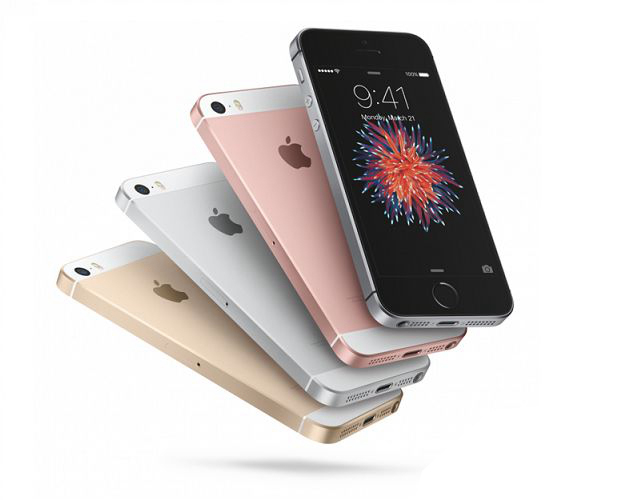
As is known to all, Apple’s new 4 inch iPhone SE has listed more than a month, maybe, a lot of friends around you have bought the new Apple product, it is the iPhone 5s’ Special Edition, in appearance, the iPhone SE and the classic iPhone 5S is the same, the LCD screen as well.

 At the same time, we lcdone also is ready for iPhone SE’s LCD screen recycling,refurbishing and resell. If you are the Apple mobile phone repair shop, we lcdone will offer the most suitable prices, the fastest speed and best after-sales service to recycle and refurbish your iPhone SE LCD screens.


LCDONE,a high-tech company providing the solutions for the mobile phone broken glass screen,including iPhone LCD recycling,Samsung Galaxy LCD recycling,iPhone LCD screen refurbishing,Samsung Galaxy LCD screen refurbishing,iPhone LCD screen replacement,iPad touch screen replacement and mobile phone accessories.

We do not produce the mobile phone lcd screen, we only do recycle,refurbish and resell lcd screen.

Surprise, now ,register on our website https://www.lcdone.com, with the referral code:jackievon001, you can get a $5 gift certificate. And if you submit order on our website, we will send the free iPhone Repair Tools Kits to you together at the time of delivery.

2016/04/26

New LCD screen replacement for iPhone SE will arrive


New LCD screen replacement for iPhone SE will arrive


As is known to all, Apple's new 4 inch iPhone SE has listed more than a month, maybe, a lot of friends around you have bought the new Apple product, it is the iPhone 5s' Special Edition, in appearance, the iPhone SE and the classic iPhone 5S is the same, the LCD screen as well.


At the same time, we lcdone also is ready for iPhone SE's LCD screen recycling,refurbishing and resell. If you are the Apple mobile phone repair shop, we lcdone will offer the most suitable prices, the fastest speed and best after-sales service to recycle and refurbish your iPhone SE LCD screens.


LCDONE,a high-tech company providing the solutions for the mobile phone broken glass screen,including iPhone LCD recycling,Samsung Galaxy LCD recycling,iPhone LCD screen refurbishing,Samsung Galaxy LCD screen refurbishing,iPhone LCD screen replacement,iPad touch screen replacement and mobile phone accessories.

We do not produce the mobile phone lcd screen, we only do recycle,refurbish and resell lcd screen.

Surprise, now ,register on our website https://www.lcdone.com, with the referral code:jackievon001, you can get a $5 gift certificate. And if you submit order on our website, we will send the free iPhone Repair Tools Kits to you together at the time of delivery.

2016/04/25

For Apple iPhone 6S LCD Screen Replacement And Digitizer Assembly with Frame - OEM Original Quality Grade

For Apple iPhone 6S LCD Screen Replacement And Digitizer Assembly with Frame


Product Specifications

Color: White/Black

Screen Size: 4.7 inches

Resolution: 750 x 1334pixels, 326 ppi pixels density

Display Type: LED-backlit IPS LCD Capacitive touchscreen, 16M colors

Protective Material: Corning Gorilla Glass


Product Features

1. This iPhone 6S LCD Screen Replacement includes the iPhone 6S LCD, iPhone 6S digitizer touch screen with frame;

2. Brand New High Quality iPhone 6S LCD Screen Replacement Part

It is used to replace the faulty screen including display problems, dead pixels, cracked LCD screens, wrong color issues;

3. The iPhone 6S LCD assembly is 100% OEM manufactured and assembled and well-protected for safe shipping.


Note:

1. Please test the iPhone 6S LCD Screen first before installation. The flex cables attached are very fragile and can be damaged or torn very easily, so please be very careful when handling them. We recommend you’d better turn to professional for help.

2. Please Note that This LCD Assembly is for iPhone 6S Only .


LCDONE,a high-tech company providing the solutions for the mobile phone broken glass screen,including iPhone LCD recycling,Samsung Galaxy LCD recycling,iPhone LCD screen refurbishing,Samsung Galaxy LCD screen refurbishing,iPhone LCD screen replacement,iPad touch screen replacement and mobile phone accessories.

We do not produce the mobile phone lcd screen, we only do recycle,refurbish and resell lcd screen.

Surprise, now ,register on our website https://www.lcdone.com, with the referral code:jackievon001, you can get a $5 gift certificate. And if you submit order on our website, we will send the free iPhone Repair Tools Kits to you together at the time of delivery.

2016/04/18

For iPhone 6S Plus LCD Screen Replacement And Digitizer Assembly with Frame - OEM Original Quality Grade

For iPhone 6S Plus LCD Screen Replacement And Digitizer Assembly with Frame - OEM Original Quality Grade

iPhone 6S Plus LCD Screen Replacement And Digitizer Assembly with Frame


Product Specifications

Color: White/Black

Screen Size: 5.5 inches

Resolution: 1080 x 1920 pixels, 401 ppi pixel density

Display Type: LED-backlit IPS LCD, capacitive touchscreen, 16M

Protective Material: Shatter proof glass, oleophobic coating


Product Features

1. This iPhone 6S Plus LCD Screen Replacement  includes the iPhone 6S Plus LCD, iPhone 6S Plus digitizer touch screen with frame;

2. Brand New High Quality iPhone 6S Plus LCD Screen Replacement Part

It is used to replace the faulty screen including display problems, dead pixels, cracked LCD screens, wrong color issues;

3. The iPhone 6S Plus LCD assembly is 100% OEM manufactured and assembled and well-protected for safe shipping.


Note:

Please test the iPhone 6S Plus LCD screen first before installation. The flex cables attached are very fragile and can be damaged or torn very easily, so please be very careful when handling them.

We recommend you’d better turn to professional for help.


LCDONE,a high-tech company providing the solutions for the mobile phone broken glass screen,including iPhone LCD recycling,Samsung Galaxy LCD recycling,iPhone LCD screen refurbishing,Samsung Galaxy LCD screen refurbishing,iPhone LCD screen replacement,iPad touch screen replacement and mobile phone accessories.

We do not produce the mobile phone lcd screen, we only do recycle,refurbish and resell lcd screen.

Surprise, now ,register on our website https://www.lcdone.com, with the referral code:jackievon001, you can get a $5 gift certificate. And if you submit order on our website, we will send the free iPhone Repair Tools Kits to you together at the time of delivery.